web2.0
sporadically for about two years with very irregular intervals, I write in this space. This blog is a window on the world wide web, and for me a way to communicate. I consider it very useful tool, it is increasingly difficult to write, now that we eat too fast and an information in which we tend to write using ctrl + c, ctrl + v. I'm beginning to think that an excess of sms, twitter and facebook, can lead to a thought too narrow in the long run to the inability to communicate complex thoughts. The summary is in itself an asset in the statement, but if excess capacity is likely to empty our communication. An average user of Web 2.0, including Twitter, Plurk, FriendFeed, Facebook, RSS feeds, mail, sms, should read hundreds of sources, thousands of news. Often you end up reading only a few lines, a few words. Serve this great volume of information then when you find the time to read a minimum of detail. To these questions I have no answer. I am user of Web 2.0, are 100% into this vortex system. Today, someone reminded me that there is a web2.0, it almost made me laugh. Web 2.0 is now mature and we are moving towards cloud computing , increasingly, it is our mail on Gmail and our photos on flickr cataloged on delicious bookmarks and RSS feeds on google reader, who wants to know where we can go on Gtalk using Latitude and know where we are. In this network that envelops us, the blog wants to be the angle of reflection on what happens. This blog really read it in a few but for me it's a gym, a place to exercise the mind.
Monday, May 25, 2009
Thursday, May 7, 2009
Internet On Sidekick Lx With At&t
odd times - and spam Rainews24
In bleak panorama of Italian television, a few days I began to follow a course quite valid. It is "odd time" a program aired on Rainews24 giving voice to the reality that they are usually ignored by commercial television. In the evening from 21.30 to 22.30 so it is possible to see this container combines interviews, news, and live performances by artists often unknown to the general public. A program that has the courage to talk about all that other tv ignore. Just take a ride on Youtube to understand what I'm talking about. The program is presented by Francesco Gatti, who took him with intelligence and calmness. A TV is not screaming, where you do not look for the brawl, but a place where new artists are presented each evening with their creations. A very nice, provided you have a good deal of curiosity about the news, to alternative styles of music, movie creations into uncomfortable topics. The program consists of a series of artist interviews conducted by the presenter / s often followed by an exhibition and live by themselves or accompanied by video footage. All in a climate that gives the viewer the opportunity to learn new art forms, leaving it to the curiosity of that responsibility to investigate. When I follow
Rainews24 on satellite in the clear. It 's a shame that the few examples of good tv channels are relegated to little usable from the crowd, but maybe it's better that way.
In bleak panorama of Italian television, a few days I began to follow a course quite valid. It is "odd time" a program aired on Rainews24 giving voice to the reality that they are usually ignored by commercial television. In the evening from 21.30 to 22.30 so it is possible to see this container combines interviews, news, and live performances by artists often unknown to the general public. A program that has the courage to talk about all that other tv ignore. Just take a ride on Youtube to understand what I'm talking about. The program is presented by Francesco Gatti, who took him with intelligence and calmness. A TV is not screaming, where you do not look for the brawl, but a place where new artists are presented each evening with their creations. A very nice, provided you have a good deal of curiosity about the news, to alternative styles of music, movie creations into uncomfortable topics. The program consists of a series of artist interviews conducted by the presenter / s often followed by an exhibition and live by themselves or accompanied by video footage. All in a climate that gives the viewer the opportunity to learn new art forms, leaving it to the curiosity of that responsibility to investigate. When I follow
Rainews24 on satellite in the clear. It 's a shame that the few examples of good tv channels are relegated to little usable from the crowd, but maybe it's better that way.
Wednesday, May 6, 2009
When Stringing 2 Wireless Network Together
Twitter
For several days I get at least 3 / 4 notifications per day by Twitter tells me that someone has started to follow my activity on that platform. The problem is that it comes from accounts created within minutes, report a first message, usually a link to sites of questionable content, and then after a while these accounts are blocked by the same Twitter. Already there's mountains of spam, but also by Twitter too.
I find Twitter a great complement Facebook in the sense that the first one I opened to the world, the second in a very limited circle of friends. The target is completely different. I hope Twitter
solve the problem soon, and that makes it even easier to report instances of spam . If someone wants to follow me on Twitter address is:
http://twitter.com/mrbyte72
For several days I get at least 3 / 4 notifications per day by Twitter tells me that someone has started to follow my activity on that platform. The problem is that it comes from accounts created within minutes, report a first message, usually a link to sites of questionable content, and then after a while these accounts are blocked by the same Twitter. Already there's mountains of spam, but also by Twitter too.
I find Twitter a great complement Facebook in the sense that the first one I opened to the world, the second in a very limited circle of friends. The target is completely different. I hope Twitter
solve the problem soon, and that makes it even easier to report instances of spam . If someone wants to follow me on Twitter address is:
http://twitter.com/mrbyte72
Sunday, May 3, 2009
How To Create Dora The Explorer Goodie Bags
Not only top
Linux operating systems offer the user excellent administrator tool for monitoring the system. I am not referring to the desktop gadget, but several tools that provide server administrator can understand any performance issues, and deploying the most appropriate corrective action.
The founder of the software and certainly the best known is top, which only a good idea about the status of CPU and RAM:
But tuning of complex hardware and software infrastructure the availability of fast CPUs and lots of RAM is not everything, in fact, the performance is often influenced by the capacity of the machine to read and write information on the storage media. Too often the problem is disk access. To diagnose problems of this type has a tool called iotop , which aggregates information dearly already available on a Linux system ( will , iostat, vmstat ) but all in a context of real-time easy to read:
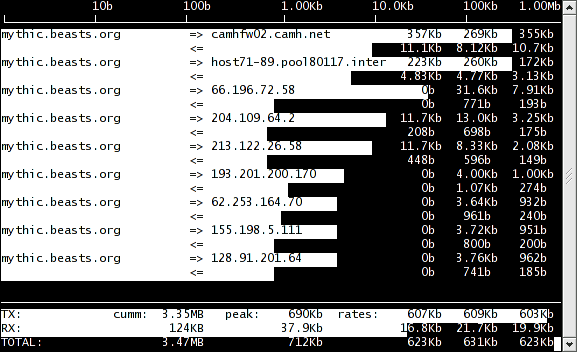
The other major bottleneck of our hypothetical installation is the ability to transmit information over the network, so the other key tool is definitely iftop . These can give a very clear idea in real time about all network resources in a web resource that may be critical and that always requires careful monitoring:
powertop instead makes a different but no less important job, or help us consume less energy, in fact, these reports all the situations that push the system to work to no avail.
Latencytop has just arrived, and has the important goal to give an overview of the process to process latency of the system:
conclude with a couple of tools that help instead from a practical point of view:
Apachetop , can give a real-time console to monitor the use of the Web-server Apache:
while mtop can lend a hand in tuning of mysql server:
The combined use of these
software, can help solve many problems of configuration before having to hack your wallet, that is certainly capable of solving all problems, but it's certainly more fun to squeeze the most of what you have available.
Linux operating systems offer the user excellent administrator tool for monitoring the system. I am not referring to the desktop gadget, but several tools that provide server administrator can understand any performance issues, and deploying the most appropriate corrective action.
The founder of the software and certainly the best known is top, which only a good idea about the status of CPU and RAM:
But tuning of complex hardware and software infrastructure the availability of fast CPUs and lots of RAM is not everything, in fact, the performance is often influenced by the capacity of the machine to read and write information on the storage media. Too often the problem is disk access. To diagnose problems of this type has a tool called iotop , which aggregates information dearly already available on a Linux system ( will , iostat, vmstat ) but all in a context of real-time easy to read:
The other major bottleneck of our hypothetical installation is the ability to transmit information over the network, so the other key tool is definitely iftop . These can give a very clear idea in real time about all network resources in a web resource that may be critical and that always requires careful monitoring:
powertop instead makes a different but no less important job, or help us consume less energy, in fact, these reports all the situations that push the system to work to no avail.
Latencytop has just arrived, and has the important goal to give an overview of the process to process latency of the system:
conclude with a couple of tools that help instead from a practical point of view:
Apachetop , can give a real-time console to monitor the use of the Web-server Apache:
while mtop can lend a hand in tuning of mysql server:
The combined use of these
software, can help solve many problems of configuration before having to hack your wallet, that is certainly capable of solving all problems, but it's certainly more fun to squeeze the most of what you have available.
Teddybear Masterbation
Asus EeePC 4G 701 Ubuntu and Netbook Remix 9:04
After several months of using ubuntu-eee version 8.04 I decided to upgrade to 8.10 and the online update did not go very well. I took the opportunity to leap to move to the new Ubuntu Netbook Remix 9:04 a few days ago issued by Canonical .
My Asus Eee PC 700 netbook a G4 is not a very powerful machine, but it certainly is a very versatile machine, it weighs little and is really small.
The setup is very simple, just downloaded from the Ubuntu img file formats, plus a special utility to write the image on your USB stick of at least 1 Gbyte. (see guide )
inserted the pen into any USB port and change the boot order to do from the pen of the first hard disk.
The setup is not at all a problem, I installed all the 4 GB SSD drive, 128 Mbytes of swap allocanto. I did not use the extra sd card in my possession, as it gave me problems when you restart the system, with constant warnings of system is not closed properly and then the corruption of the disc itself (in fact this is the second attempt).
The first impact is with a very slow, the problem is known just make the following changes:
"Desktop performance of netbook-launcher is slow using the default settings.
To fix this launch gconf- editor and enable / apps / netbook-launcher / force_low_graphics. " done this for all users that you intend to use you can go to customize your system. Personally
:
$ sudo apt-get update
$ sudo apt-get install ssh mc
edit adding those repositories are not enabled by default, then updates.
4 Gbytes are few, but if you have ideas clear up what a netbook is more than sufficient, relevant I delete a lot of stuff:
$ sudo apt-get remove totem totem-common totem-gstreamer totem-mozilla totem-plugins
$ sudo apt-get remove rhythmbox
$ sudo apt-get remove evolution evolution-common evolution-data-server evolution-documentation-en-indicator evolution evolution-plugins evolution-webcal
The microphone does not work by default but you just fiddle with the settings for mixer solve the problem.
To enable the management of the Fn + F2 Wireless Hotkeys for
I installed eee-control , taking him from: $ wget
http://greg.geekmind.org/eee-control/deb/eee- control_0.9.2_all ~ jaunty.deb
Open Office on a system does not need, but that's just my personal opinion:
$ sudo apt-get remove openoffice.org openoffice.org-base openoffice.org-calc openoffice.org-common openoffice.org -core openoffice.org-draw openoffice.org-evolution openoffice.org-filter-MobileDevice openoffice.org-gnome openoffice.org-gtk openoffice.org-help-en-us openoffice.org-impress openoffice.org-java-common openoffice.org-math openoffice.org-style-human openoffice.org-writer
make space
$ sudo apt-get remove brltty
$ sudo apt-get remove $ wodim
sudo apt-get remove - purge tomboy
$ Sudo apt-get remove - purge libdeskbar-tracker tracker libtrackerclient0
$ sudo apt-get remove gnome-pilot
$ sudo apt-get remove - purge mono-common
$ sudo apt- get remove compiz-core desktop-effects
$ sudo apt-get remove cellwriter
I proceed to install what you need:
$ sudo apt-get install mc
$ sudo apt-get install
ssh $ sudo apt-get install powertop iotop iftop latencytop
$ sudo apt-get install cups-pdf
$ sudo / etc / init.d / cups restart
Enables multimedia repository: $ sudo wget
http://www.medibuntu.org/sources.list.d/jaunty.list - output-document = / etc / apt / sources.list.d / medibuntu.list
$ sudo apt-get update
$ sudo apt-get install medibuntu-keyring
$ sudo apt-get update
$ sudo update-apt-xapian-index
what you need to build on the fly something
$ sudo aptitude install build-essential
support java:
$ sudo apt-get install sun-java6-jre sun-java6-plugin sun-java6-fonts
what you need to chat:
$ sudo apt-get install emesene
$ wget http://www.skype.com/go/getskype-linux-ubuntu
$ sudo dpkg-i skype *
support flash or nothing youtube:
$ sudo apt-get install adobe-flashplugin
lastfm to listen to some music:
$ sudo apt-get install lastfm
well now the eeepc is perfect for browsing the Internet! and you still have plenty of space available:
mrbyte @ eeepc: ~ $ df-h
File System Size Used Avail. Use% Mounted on
/ dev/sda2 3.6 G 2.1 G 1.3 G 63% /
245m 245m 0% 0 tmpfs / lib / init / rw
varrun 245m 245m 112K 1% / var / run
varlock 245m 245m 0 0% / var / lock udev
245m 245m 148K 1% / dev
tmpfs 245m 245m 76K 1% / dev / shm lrm
245m 243m 1% 2.4 M / lib/modules/2.6.28-11-generic/volatile
mrbyte @ eeepc: ~ $
After several months of using ubuntu-eee version 8.04 I decided to upgrade to 8.10 and the online update did not go very well. I took the opportunity to leap to move to the new Ubuntu Netbook Remix 9:04 a few days ago issued by Canonical .
My Asus Eee PC 700 netbook a G4 is not a very powerful machine, but it certainly is a very versatile machine, it weighs little and is really small.
The setup is very simple, just downloaded from the Ubuntu img file formats, plus a special utility to write the image on your USB stick of at least 1 Gbyte. (see guide )
inserted the pen into any USB port and change the boot order to do from the pen of the first hard disk.
The setup is not at all a problem, I installed all the 4 GB SSD drive, 128 Mbytes of swap allocanto. I did not use the extra sd card in my possession, as it gave me problems when you restart the system, with constant warnings of system is not closed properly and then the corruption of the disc itself (in fact this is the second attempt).
The first impact is with a very slow, the problem is known just make the following changes:
"Desktop performance of netbook-launcher is slow using the default settings.
To fix this launch gconf- editor and enable / apps / netbook-launcher / force_low_graphics. " done this for all users that you intend to use you can go to customize your system. Personally
:
$ sudo apt-get update
$ sudo apt-get install ssh mc
edit adding those repositories are not enabled by default, then updates.
4 Gbytes are few, but if you have ideas clear up what a netbook is more than sufficient, relevant I delete a lot of stuff:
$ sudo apt-get remove totem totem-common totem-gstreamer totem-mozilla totem-plugins
$ sudo apt-get remove rhythmbox
$ sudo apt-get remove evolution evolution-common evolution-data-server evolution-documentation-en-indicator evolution evolution-plugins evolution-webcal
The microphone does not work by default but you just fiddle with the settings for mixer solve the problem.
To enable the management of the Fn + F2 Wireless Hotkeys for
I installed eee-control , taking him from: $ wget
http://greg.geekmind.org/eee-control/deb/eee- control_0.9.2_all ~ jaunty.deb
Open Office on a system does not need, but that's just my personal opinion:
$ sudo apt-get remove openoffice.org openoffice.org-base openoffice.org-calc openoffice.org-common openoffice.org -core openoffice.org-draw openoffice.org-evolution openoffice.org-filter-MobileDevice openoffice.org-gnome openoffice.org-gtk openoffice.org-help-en-us openoffice.org-impress openoffice.org-java-common openoffice.org-math openoffice.org-style-human openoffice.org-writer
make space
$ sudo apt-get remove brltty
$ sudo apt-get remove $ wodim
sudo apt-get remove - purge tomboy
$ Sudo apt-get remove - purge libdeskbar-tracker tracker libtrackerclient0
$ sudo apt-get remove gnome-pilot
$ sudo apt-get remove - purge mono-common
$ sudo apt- get remove compiz-core desktop-effects
$ sudo apt-get remove cellwriter
I proceed to install what you need:
$ sudo apt-get install mc
$ sudo apt-get install
ssh $ sudo apt-get install powertop iotop iftop latencytop
$ sudo apt-get install cups-pdf
$ sudo / etc / init.d / cups restart
Enables multimedia repository: $ sudo wget
http://www.medibuntu.org/sources.list.d/jaunty.list - output-document = / etc / apt / sources.list.d / medibuntu.list
$ sudo apt-get update
$ sudo apt-get install medibuntu-keyring
$ sudo apt-get update
$ sudo update-apt-xapian-index
what you need to build on the fly something
$ sudo aptitude install build-essential
support java:
$ sudo apt-get install sun-java6-jre sun-java6-plugin sun-java6-fonts
what you need to chat:
$ sudo apt-get install emesene
$ wget http://www.skype.com/go/getskype-linux-ubuntu
$ sudo dpkg-i skype *
support flash or nothing youtube:
$ sudo apt-get install adobe-flashplugin
lastfm to listen to some music:
$ sudo apt-get install lastfm
well now the eeepc is perfect for browsing the Internet! and you still have plenty of space available:
mrbyte @ eeepc: ~ $ df-h
File System Size Used Avail. Use% Mounted on
/ dev/sda2 3.6 G 2.1 G 1.3 G 63% /
245m 245m 0% 0 tmpfs / lib / init / rw
varrun 245m 245m 112K 1% / var / run
varlock 245m 245m 0 0% / var / lock udev
245m 245m 148K 1% / dev
tmpfs 245m 245m 76K 1% / dev / shm lrm
245m 243m 1% 2.4 M / lib/modules/2.6.28-11-generic/volatile
mrbyte @ eeepc: ~ $
Birthday Poem Requesting Gift Of Money
Ubuntu 9.04 Desktop
last few days I installed the new deployment, as always, the setup is simple and painless. For the first time I'm trying the new ext4 file system , which should ensure better performance, making sure to keep the car under UPS.
Once completed the installation of the system will proceed according to the customization of installed packages.
The first thing I do is install mc:
$ sudo apt-get install mc
following installation of the sshd server :
$ sudo apt-get install ssh
can not miss the tool a complete monitoring system:
$ sudo apt-get install powertop iotop iftop latencytop
with a few clicks after you install my HP 1100 printer, proceed to install a pdf stampande: $ sudo
apt-get install cups-pdf
$ sudo / etc / init.d / cups restart
media enable the extra repositories: $ sudo wget
http://www.medibuntu.org/sources.list.d / jaunty.list - output-document = / etc / apt / sources.list.d / medibuntu.list
sudo apt-get update
$ sudo apt-get install medibuntu-keyring sudo apt
-get update $ sudo update-apt-xapian-index
might have to compile anything on the fly:
$ sudo aptitude install build-essential
some additional software: $ sudo apt
-get install ubuntu-restricted-extras
now your pc is ready to install everything you need to become a multimedia desktop:
$ sudo apt-get install mplayer smplayer vlc
$ sudo apt-get install gnome-mplayer
$ sudo apt-get install mozilla-mplayer
not forget that Java could use:
$ sudo apt-get install sun-java6-jre sun-java6-plugin sun-java6-fonts
pass software to communicate with our friends:
$ sudo apt-get install emesene
command line
$ wget http://www.skype.com/go/getskype-linux-ubuntu
$ sudo dpkg-i skype *
install the Cisco VPN support:
$ sudo apt-get install network-manager-vpnc
may also be used VirtualBox:
$ sudo apt-get install virtualbox-ose virtualbox-ose -guest-source virtualbox-ose-guest-utils dkms
In less than a couple of hours you will have a complete, functional and current,.
last few days I installed the new deployment, as always, the setup is simple and painless. For the first time I'm trying the new ext4 file system , which should ensure better performance, making sure to keep the car under UPS.
Once completed the installation of the system will proceed according to the customization of installed packages.
The first thing I do is install mc:
$ sudo apt-get install mc
following installation of the sshd server :
$ sudo apt-get install ssh
can not miss the tool a complete monitoring system:
$ sudo apt-get install powertop iotop iftop latencytop
with a few clicks after you install my HP 1100 printer, proceed to install a pdf stampande: $ sudo
apt-get install cups-pdf
$ sudo / etc / init.d / cups restart
media enable the extra repositories: $ sudo wget
http://www.medibuntu.org/sources.list.d / jaunty.list - output-document = / etc / apt / sources.list.d / medibuntu.list
sudo apt-get update
$ sudo apt-get install medibuntu-keyring sudo apt
-get update $ sudo update-apt-xapian-index
might have to compile anything on the fly:
$ sudo aptitude install build-essential
some additional software: $ sudo apt
-get install ubuntu-restricted-extras
now your pc is ready to install everything you need to become a multimedia desktop:
$ sudo apt-get install mplayer smplayer vlc
$ sudo apt-get install gnome-mplayer
$ sudo apt-get install mozilla-mplayer
not forget that Java could use:
$ sudo apt-get install sun-java6-jre sun-java6-plugin sun-java6-fonts
pass software to communicate with our friends:
$ sudo apt-get install emesene
command line
$ wget http://www.skype.com/go/getskype-linux-ubuntu
$ sudo dpkg-i skype *
install the Cisco VPN support:
$ sudo apt-get install network-manager-vpnc
may also be used VirtualBox:
$ sudo apt-get install virtualbox-ose virtualbox-ose -guest-source virtualbox-ose-guest-utils dkms
In less than a couple of hours you will have a complete, functional and current,.
Subscribe to:
Posts (Atom)